5 Best Instagram DM Tools for Coaches (2026)
Our ranked Instagram DM tool picks for coaches, compared by lead magnet delivery, contact capture, follow-up, channel mix, and plan limits.
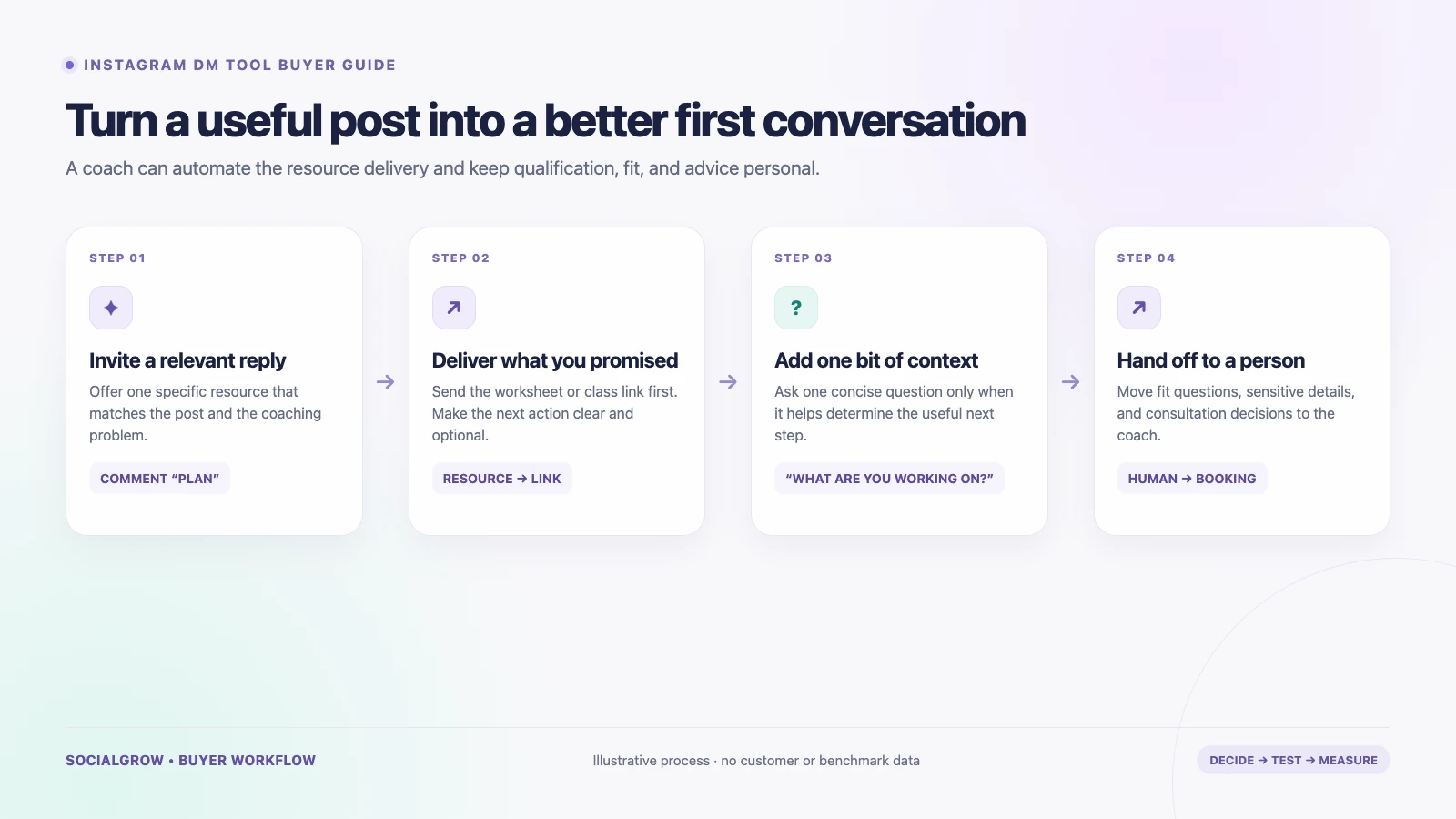
For most coaches, the useful Instagram DM tool is the one that reliably delivers the resource a person asked for, keeps the next step clear, and leaves nuanced sales conversations to a human. Before paying for an AI sales agent or a large automation suite, decide whether you need a simple comment-to-DM flow, contact capture, or a team inbox.
We rank these tools for a coach’s path from a post or Story interaction to a useful resource, optional lead context, and a consultation or human follow-up. Instagram trigger fit, resource delivery, lead capture, follow-up, and plan limits drive the order. SocialGrow is our product. Product, feature, and plan details below were checked September 24, 2026; verify current terms before buying.
If you need the broader Instagram system for a coaching business, start with our Instagram marketing guide for coaches and consultants. For tools focused on qualified lead capture across industries, see the Instagram DM lead-generation tools comparison.
Quick comparison
| Ranked pick | Best fit for a coach | Check before buying |
|---|---|---|
| #1 SocialGrow | Delivering a guide or booking link after an Instagram comment or Story reply, with optional contact capture and link tracking | Confirm the exact trigger, fields, follow-up and reporting available on your plan; connect a booking or CRM destination if your process needs one. Product · Pricing |
| #2 ManyChat | Building flows across Instagram and other supported messaging channels | Active-contact limits and overages vary by plan; one Instagram account is connected per ManyChat account. Pricing · account setup |
| #3 CreatorFlow | A simpler creator workflow with email collection before link delivery and click tracking | The public plan limits are per workspace; check whether the team and downstream lead handoff meet your needs. Pricing |
| #4 LinkDM | Sending a course, worksheet, or offer link after a post, Reel, Story, or comment trigger | The pricing page lists lead generation on Pro; check what is stored and how a teammate can follow up. Pricing |
| #5 Chatfuel | Sending a commenter to WhatsApp when that is where the coach handles the next conversation | Its linked page describes a comment-to-WhatsApp route; confirm the current scope and any separate WhatsApp requirements. Workflow |
5 best Instagram DM tools for coaches, ranked
1. SocialGrow: deliver a resource and track the next click
SocialGrow’s public product pages describe Instagram comment-to-DM, Story replies, link delivery, contact capture, follow-ups, and link tracking. That maps well to a coach offering a worksheet, class details, an application page, or a booking link from a specific post.
Use it when the trigger and response are predictable. For example, a Reel can invite someone to comment PLAN; the DM delivers the plan and offers an optional next step. The coach should still handle advice, fit questions, pricing exceptions, and personal circumstances.
Verify: test the exact trigger and lead fields in a real trial, then confirm where the contact and click data appear. If your business depends on calendar booking or a CRM handoff, check the integration path before building your process around it.
2. ManyChat: flows across several messaging channels
ManyChat supports Instagram and other messaging channels, with automation, contact collection, and follow-up options described on its public pages. Its current pricing uses monthly active contacts; the official pricing page lists Free, Essential, Pro, and higher plans, with included-contact limits and possible overages. The exact plan shown can depend on region and account eligibility.
A good fit when: you already need a broader multi-channel messaging setup or want to build branching flows around a lead magnet.
Check: forecast monthly active contacts rather than follower count, review overage controls, and confirm the channels and user seats you need. ManyChat’s account guide says each ManyChat account can connect one Instagram business account; a second Instagram account needs a separate account and billing.
3. CreatorFlow: a flat-rate link and email workflow
CreatorFlow’s current pricing page lists one Instagram account and 500 automated DMs per month on Free. Pro lists two accounts, 5,000 DMs per workspace per month, email collection, link-click tracking, CSV export, and geo analytics. The page lists Pro at US$15 monthly or US$12 per month billed annually.
A good fit when: your main flow is sending a resource link and you want a simple way to collect emails or review link clicks.
Check: verify that the request for an email is clear and optional where appropriate, and ask how you can move a lead into your existing booking, CRM, or email system.
4. LinkDM: a lightweight post-to-link option
LinkDM lists post and Reel auto-replies and Story automations on Free, with one Instagram account and up to 1,000 DMs per month. Its US$19 monthly Pro plan lists up to three accounts and 25,000 DMs per month, with comment auto-reply, flow automation, and lead generation.
A good fit when: you want to deliver a link from content and do not need a complex multi-channel operation.
Check: test the lead-generation export and follow-up workflow, and confirm how the monthly DM allowance is counted for your use.
5. Chatfuel: a WhatsApp handoff
Chatfuel’s current Instagram page advertises a flow that sends a WhatsApp link after a person comments. This is worth considering if your coaching business already runs consultations or follow-up in WhatsApp.
A good fit when: the intended next step is a WhatsApp conversation, rather than keeping all qualification and follow-up in Instagram.
Check: the cited page describes this specific flow. Confirm access, terms, and whether the WhatsApp destination is appropriate for your audience before you use it.
Choose the tool by the next step you need
- Resource only: send the promised guide or class details. A comment-to-DM tool is usually enough.
- Resource plus a lead record: compare contact capture, consent wording, exports, and where the information goes.
- Qualification: ask one useful question after delivering the resource. Keep sensitive or nuanced questions for a person.
- Consultation: link to your actual booking or application process. Do not count a link send or click as a booked call.
- Team follow-up: test whether the right person can see the original post, trigger, messages, and contact details.
Here is a measurement template for one campaign. Fill it with your own observed counts; it contains no industry benchmark:
| Stage | Your count | Source to check |
|---|---|---|
| Eligible comments or Story replies | ___ | Instagram / automation report |
| First DM delivered | ___ | Automation report |
| Resource link clicked | ___ | Link analytics |
| Person chose to share contact details | ___ | Lead record |
| Qualified conversation | ___ | Your stated qualification rule |
| Consultation booked | ___ | Calendar or CRM |
Report the date range, duplicates, and source for each count. A send, click, lead, and booked consultation are different events.
What coaches should not automate
Keep the first message short and relevant. Do not send a pitch to every person who comments, collect personal details without explaining why, or let a bot answer sensitive health, financial, or relationship questions. Make it easy to ask for a person, and set a clear stop condition for follow-up.
For platform permissions, review Meta’s Instagram Messaging API documentation. To write the first response, use our Instagram auto-reply message examples. To compare the general tool category, see best Instagram DM automation tools.
Sources and ranking method: Vendor product, help, and pricing pages linked above were checked September 24, 2026. We rank by published fit for the workflow and criteria described above. SocialGrow is our product. The order is an editorial fit judgment for the coach workflow described above, not a comparative lead or booking result.
Ready to build a simple resource-delivery flow? Review SocialGrow’s lead-capture workflow and its current plan details.
Related Articles
Instagram Auto DM for Small Business
Learn how small businesses use Instagram auto DMs to answer questions, deliver links, capture consented leads, and follow up without losing the human touch.
automationInstagram Keyword Triggers: Comment-to-DM Guide
Learn how Instagram keyword triggers work, how to write useful comment-to-DM messages, and how creators and small businesses can capture leads.
automation5 Best Instagram Comment-to-DM Tools, Ranked (2026)
See five ranked Instagram comment-to-DM tools for 2026, compared by trigger fit, first reply, lead capture, plan limits, and handoff.
Ready to automate your Instagram engagement?
Turn every comment into a conversation with SocialGrow.
Start Free Trial7-day free trial · No credit card required