5 Best Instagram DM Tools for Lead Generation (2026)
Our ranked Instagram DM tools for lead generation, compared by contact capture, qualification, routing, reporting, and plan limits.
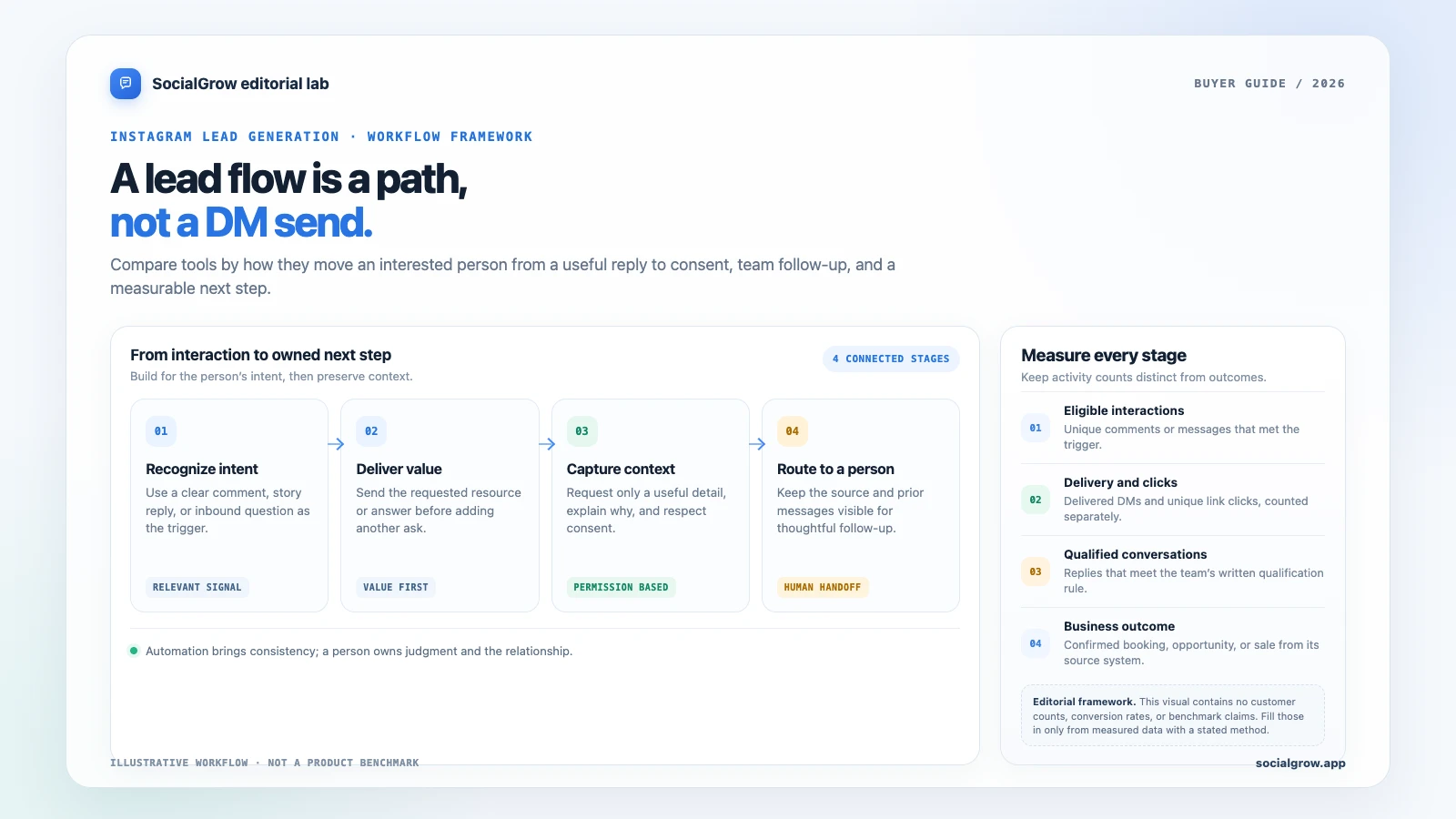
An Instagram DM tool for lead generation needs to do more than send an automatic reply. The useful path is: recognize a relevant interaction, deliver what the person asked for, capture only the context you need, make the conversation visible to a person, and measure what happened next.
For an Instagram-first lead workflow, compare SocialGrow with ManyChat and CreatorFlow. LinkDM and Chatfuel can suit narrower link-delivery or WhatsApp-handoff jobs. Their public pages describe different limits and features, so the right shortlist depends on where your lead should go after the first message.
We rank the shortlist for an Instagram lead path: relevant trigger, promised resource, consented contact context, qualification, team handoff, and measurement. Tools that support more of that path rank ahead of link-only delivery or a channel switch. SocialGrow is our product. Plan details below were checked September 24, 2026; confirm current prices and terms on linked provider pages.
Quick comparison: Instagram lead-generation tools
| Ranked pick | Lead-generation fit | Public plan signal | Verify before committing |
|---|---|---|---|
| #1 SocialGrow | Comment, DM, and story workflows connected to lead capture, follow-up, an inbox, and reporting | Current plan details on SocialGrow pricing; workflow on the lead-capture page | Which lead fields, exports, source context, and team actions are available in your plan. |
| #2 ManyChat | Collect contact information and coordinate automations across supported messaging channels | Free: 25 active contacts/month. Essential starts at US$14/month with 250 included contacts. Pricing | Contact overages, the channel and feature gates, and the total price for your billing country. |
| #3 CreatorFlow | Instagram comment/story automation with email collection and link-click tracking on paid plans | Free: 1 account and 500 DMs/month. Pro: US$15 monthly or US$12/month billed yearly. Pricing | DMs per workspace, what counts as a captured email, exports, and team handoff. |
| #4 LinkDM | Comment and post automation for delivering links; its Pro plan lists a lead-generation feature | Free: 1 account and 1,000 DMs/month. Pro: US$19/month, up to 3 accounts and 25,000 DMs/month. Pricing | What information the lead-generation feature records and where it can be exported. |
| #5 Chatfuel | A narrow path from an Instagram comment to a WhatsApp conversation | The current Instagram comments page advertises a free comment-to-WhatsApp flow. | Whether the WhatsApp step, contact capture, and team process match your sales workflow. |
ManyChat’s public pricing page says final prices depend on billing country and lists overage pricing for active contacts above included limits. CreatorFlow and LinkDM publish monthly DM and account limits. These are different billing units: estimate your expected contacts, messages, and accounts before comparing headline prices.
What should a lead-generation tool actually do?
1. Start with an intentional signal
Use a specific comment, story reply, or inbound message that indicates interest. A keyword such as GUIDE or PRICE is easier to explain and measure than a broad rule that treats every comment as a sales lead.
2. Deliver value before asking for information
Send the resource, answer, or link the person expected. If an email or another detail is needed, explain what the person will receive and why the information is being requested. Keep the request relevant and make the next step clear.
3. Preserve enough context for the team
The useful record is more than a name or email. Keep the source post or campaign, the question or offer, what the person requested, and what the automation already sent. Check that a teammate can find that context and take over the thread.
4. Measure the next action, not just the send
Separate trigger matches, successful message delivery, link clicks, consented contacts, qualified conversations, and outcomes such as a booked consultation or purchase. Do not label a message send as a lead, or a click as a sale.
Five tools to evaluate for lead capture
1. SocialGrow: Instagram conversations and follow-up in one workflow
SocialGrow’s current product pages describe Instagram comment and story automations, lead capture, follow-up, a shared inbox, analytics, and CSV export. This makes it a candidate when the sales process starts in Instagram and a person needs to continue from the automation with the original conversation context.
Review the lead-capture workflow, Instagram auto-reply page, and current pricing. In a trial, create one real campaign and check its trigger, fields, handoff, and report end to end.
2. ManyChat: lead capture across more than Instagram
ManyChat lists contact collection and audience segmentation on its paid plans, with Instagram and other messaging channels available depending on plan. Its public pricing currently shows 25 active contacts per month on Free, 250 on Essential from US$14/month, and 2,500 on Pro from US$29/month. Additional contacts may add cost, and the page says final prices depend on billing country.
This is worth evaluating if your lead workflow spans supported channels. Estimate active contacts and overages, then confirm that your needed Instagram feature and team workflow are included. See ManyChat’s pricing and free-plan limits.
3. CreatorFlow: email collection and link analytics
CreatorFlow lists email collection before sending links, click tracking, CSV export, and geo analytics on its Pro plan. The published limit is 5,000 DMs per workspace per month; its Free plan lists one Instagram account and 500 automated DMs per month.
It is a candidate for a creator or service business that wants a light email-capture and link-tracking workflow. Check how the email request appears to the person, what the CSV includes, and how multiple team members see or own a lead. Details are on CreatorFlow’s pricing page.
4. LinkDM: link delivery with a paid lead-generation feature
LinkDM’s Free plan lists post and Reel auto-replies, story automations, one connected Instagram account, and up to 1,000 DMs each month. Its US$19/month Pro plan lists comment auto-reply and lead generation, along with up to three accounts and 25,000 DMs each month.
This may fit a creator whose first requirement is delivering a resource from content. Before treating it as a lead system, check what the lead-generation feature stores, how the data exports, and whether a teammate can take over. See LinkDM pricing.
5. Chatfuel: Instagram-to-WhatsApp lead handoff
Chatfuel’s current Instagram comments page describes a workflow that replies to a commenter with a WhatsApp link. That can fit a business whose salesperson qualifies leads in WhatsApp instead of an Instagram inbox.
The page describes this specific route, so verify its current access requirements, what information is captured, and any broader product charges. See the Chatfuel Instagram comment workflow.
Example: measure a comment-to-consultation workflow
Imagine a coach offers a consultation checklist in a Reel. A person comments “CHECKLIST,” receives the requested resource, and is then offered an optional question about their goal. A qualified reply can be routed to a person who sees the original Reel and the messages already sent.
The example is a workflow illustration, not customer-performance data. A real campaign report can use this scorecard:
| Stage | Count | What to count |
|---|---|---|
| Eligible keyword comments | ___ | Unique comments that met the campaign rule |
| First DM delivered | ___ | Messages confirmed as delivered |
| Resource link clicked | ___ | Unique tracked clicks, separated from sends |
| Contact details shared with consent | ___ | People who chose to provide the requested detail |
| Qualified conversations | ___ | Replies meeting the team’s stated qualification rule |
| Consultations booked / sales completed | ___ | Confirmed downstream outcomes from the booking or sales system |
Report the date range, the number of eligible interactions, how duplicate people were handled, and where the downstream outcome came from. If you do not have enough data to calculate a rate, report the raw counts and say so.
How to choose between Instagram lead tools
- Map your path: Write down the trigger, first reply, optional lead question, destination, and human owner.
- Set the record: Decide which fields and source details your team genuinely needs. Avoid collecting personal information “just in case.”
- Test the handoff: Use a test account to confirm the right person can see the thread, context, and next step.
- Check the limits: Compare active contacts, DMs, accounts, seats, integrations, export options, and billing term at realistic use.
- Choose the measurement: Decide what counts as a qualified lead and where booked meetings or purchases will be recorded.
- Review authorization: Start with Meta’s Instagram Messaging API documentation and confirm the provider’s current connection flow. Do not share your Instagram password.
For a practical setup, see the comment-to-DM lead-generation guide. To compare the wider tool category, use the best Instagram automation tools guide or the Instagram auto-reply tools comparison.
Sources and ranking method: Vendor product, help, and pricing pages linked above were checked September 24, 2026. We rank by published fit for the workflow and criteria described above. SocialGrow is our product. The ranking uses documented lead-workflow features and plan terms; it does not claim lead volume, conversion, or revenue.
Ready to connect an Instagram interaction to an organized follow-up? Review SocialGrow’s lead-capture workflow and current plan details.
Frequently asked questions
What is the best Instagram DM automation tool for lead generation? +
Choose based on where your lead data goes, what context the team can see, how a person takes over, and whether you can measure clicks and qualified next steps. SocialGrow, ManyChat, CreatorFlow, LinkDM, and Chatfuel each present different workflows and limits; test the exact path you plan to use.
Can Instagram DM automation collect email addresses? +
Some providers list email collection or lead-generation features. Explain why you are asking, collect only what you need, and verify where the data is stored, how it can be exported, and what consent and privacy rules apply to your audience.
What should I measure in an Instagram lead campaign? +
Track unique trigger events, delivered messages, link clicks, consented contacts, qualified conversations, and the downstream action such as a booked call or sale. A sent DM is not the same as a lead or a customer.
Related Articles
5 Best Instagram DM Tools for Real Estate Agents (2026)
Ranked Instagram DM tools for real estate agents, compared by listing links, viewing enquiries, lead context, handoff, and plan limits.
automation5 Best Instagram DM Tools for Local Service Businesses (2026)
Ranked Instagram DM tools for local services, compared by quote requests, service-area checks, booking links, routing, and team follow-up.
automationInstagram DM Automation for Real Estate Agents
A practical Instagram DM automation system for real estate agents. Reply to listing enquiries, qualify buyers, and book showings without losing the human touch.
Ready to automate your Instagram engagement?
Turn every comment into a conversation with SocialGrow.
Start Free Trial7-day free trial · No credit card required