5 Best Instagram DM Tools for Course Creators (2026)
Ranked Instagram DM tools for course creators, compared by waitlist capture, lesson links, email consent, source tracking, and follow-up.
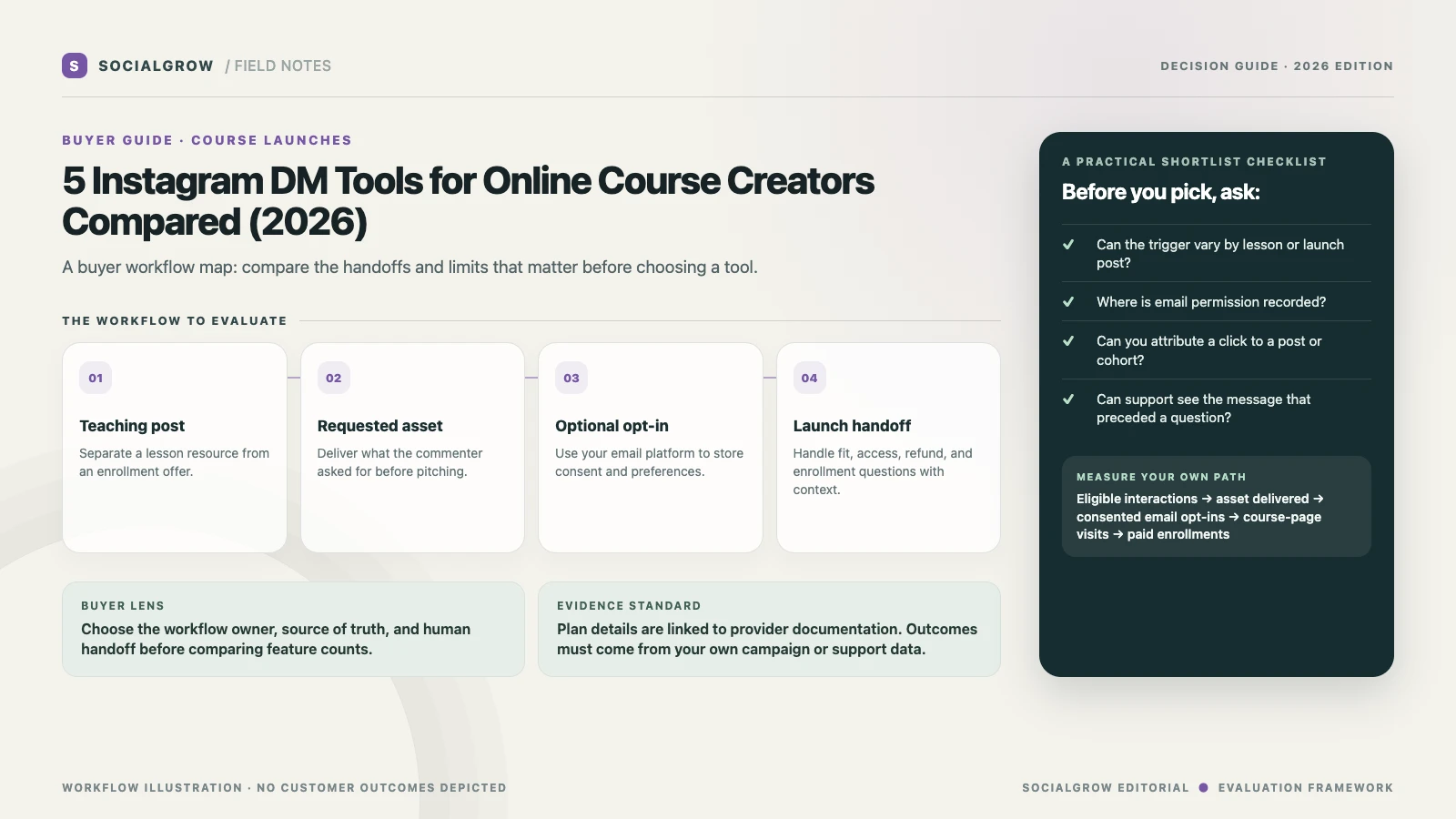
For a course creator, an Instagram DM tool should help deliver the specific lesson, worksheet, waitlist, or enrollment page a person requested. It should also make the next step measurable. The platform should not blur a free resource request into consent for a marketing sequence; collect email permission clearly and store it in the email or course system that manages subscriptions.
This shortlist compares five tools for the Instagram side of a launch. It does not compare course hosts, checkout platforms, webinar systems, or email service providers. Your course platform remains the source of truth for enrollment, refunds, and access.
5 best Instagram DM tools for course creators, ranked
We rank these tools for a course creator’s launch path from an Instagram interaction to a waitlist or lesson resource, optional email capture, and launch follow-up. Email gating, link tracking, trigger control, and plan limits matter most. CreatorFlow ranks first for its documented email-gate and click-tracking workflow; SocialGrow is our product.
| Ranked pick | Where it may fit | Verify before committing |
|---|---|---|
| #1 CreatorFlow | A simple path from a course comment or Story reply to a lesson, launch page, or waitlist link, with optional email capture and click tracking. | Check email consent and workspace volume against the busiest launch; the course platform should own enrollment and payment records. Pricing · trigger guide |
| #2 SocialGrow | Use a post-specific flow to deliver the requested course resource and give interested learners a clear path to the launch page or a person. | Test launch dates, lead context, follow-up ownership, and the handoff to the email or course system you already use. Product overview · Pricing |
| #3 ManyChat | A more flexible visual flow when a launch needs Instagram plus other supported messaging channels. | Model contact growth during enrollment week and verify which channels and fields are available on the plan you would buy. Pricing |
| #4 LinkDM | Deliver the current course syllabus, webinar-registration, or enrollment page from an eligible post or Reel. | Confirm DM caps and plan gates, and do not let a stale message template promise dates, prices, or remaining seats. Pricing |
| #5 Chatfuel | Move a prospective student to WhatsApp when the course team runs admissions questions there. | Check how the course or cohort context carries over and whether a person answers questions about fit, payment, or access. Instagram workflow |
Compare evergreen and launch-month volume
Separate evergreen lead magnets from launch-week traffic. Estimate how many DMs a launch sends, how many contacts become active, which accounts and staff seats need access, and whether email gating is required. The billing units differ across CreatorFlow, ManyChat, and LinkDM, so compare a normal month and your busiest launch.
Test the workflow before buying
Test the exact path from a launch post to a waitlist or lesson page. Verify the email prompt and consent wording, source attribution, what happens when a person does not opt in, and how the team follows up without sending a duplicate sequence.
Map the launch before you buy
Write down separate flows for three moments:
- Evergreen lesson: a commenter requests a checklist, receives the asset, and can choose to view the related course page.
- Waitlist: a person asks for cohort details, sees the dates and eligibility, then opts in through a form that records consent.
- Enrollment week: a commenter receives the current enrollment page; questions about fit, payment, accommodations, or access reach a person.
Do not put launch dates, prices, or seat counts in a template unless someone owns keeping them current. A stale “doors open today” DM can undermine trust. If the course is sold in multiple currencies or time zones, link to a page that presents the right current terms.
Compare the handoff, not the flow-builder screenshot
Ask each provider whether the source post and trigger can be identified later, what fields can be captured, whether data can be exported or synced, and how teammates take over. Verify that the reply tells the student what they will receive and what happens after they click. Count a delivered worksheet, opted-in subscriber, checkout, and paid enrollment separately.
Build a course launch measurement sheet
For each post or launch campaign, record: eligible comments or Story replies, DMs delivered, unique resource clicks, opt-ins where permission was given, course-page visits, checkout starts, and confirmed purchases. Calculate opt-in rate = consented email signups ÷ unique resource-page visitors and purchase rate = paid enrollments ÷ course-page visitors. Use your own analytics, a fixed date range, and deduplicated people; these formulas are not market benchmarks.
Start with the existing Instagram guide for online course creators for content and launch planning. For qualification and contact routing across offer types, read the lead-generation tools comparison. If a predictable trigger-and-link workflow is enough, review SocialGrow lead capture and pricing.
Sources and ranking method: Vendor product, help, and pricing pages linked above were checked September 24, 2026. We rank by published fit for the workflow and criteria described above. SocialGrow is our product. The ranking covers documented course waitlist and launch-link fit, not enrollment or revenue results.
Frequently asked questions
Can Instagram DMs collect course leads? +
A tool may offer a contact or email collection step, but explain why the email is requested and make the expected follow-up clear. Store consent in the system you use to manage email subscriptions.
Should every commenter receive a course sales pitch? +
No. Deliver the resource or information the person asked for first. Make the commercial next step clear and optional.
How do I attribute course sales to Instagram automation? +
Use campaign-specific links or analytics parameters, then compare unique visitors, checkout starts, and confirmed enrollments in the course or payment system.
Related Articles
How to Sell Online Courses on Instagram: Launch Strategy
Plan Instagram content, waitlists, consented lead capture, and course enrollment follow-up without relying on unverified conversion benchmarks.
automation5 Best Instagram DM Tools for Digital Product Creators (2026)
Ranked Instagram DM tools for digital product and affiliate creators, compared by link delivery, consent, click tracking, and follow-up.
automation5 Best Instagram DM Tools for Lead Generation (2026)
Our ranked Instagram DM tools for lead generation, compared by contact capture, qualification, routing, reporting, and plan limits.
Ready to automate your Instagram engagement?
Turn every comment into a conversation with SocialGrow.
Start Free Trial7-day free trial · No credit card required