4 Best Instagram Helpdesk Tools for Shopify (2026)
Our ranked Instagram helpdesks for Shopify, compared by DM and comment coverage, order context, ticket routing, setup, and plan requirements.
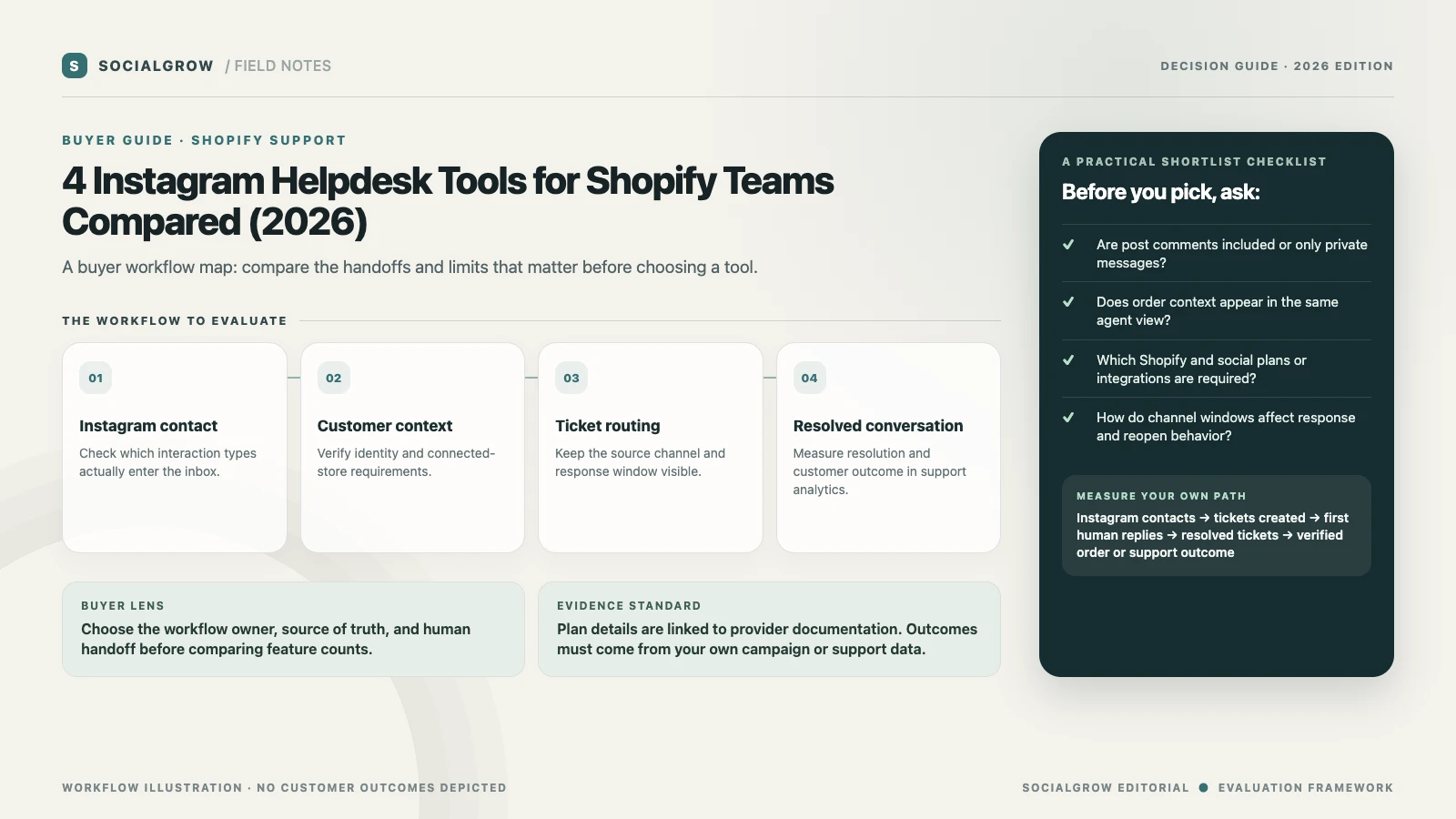
A Shopify support team comparing Instagram helpdesks is choosing a place for customer conversations, tickets, order context, and team ownership. That is a different purchase from a comment-to-DM campaign tool. Before buying, check exactly which Instagram events create tickets, whether the customer’s Shopify history is visible, and what plan or social add-on is required.
We rank these helpdesks for a Shopify support team that needs to turn the Instagram events it handles into owned, routed support conversations with useful store context. We weigh channel coverage, Shopify context, ticket ownership, and setup or plan restrictions. SocialGrow is our product; its published offering is campaign automation, so it is outside this Shopify order-support comparison.
| Ranked pick | Instagram and Shopify fit | Limits to check |
|---|---|---|
| #1 Gorgias | Ecommerce helpdesk with Instagram messages, comments, mentions, ad comments, and Shopify customer/order context. | The Instagram app and Shopify connection have separate setup requirements. Confirm channels, supported actions, and AI Agent beta availability if needed. Instagram · Shopify setup · Pricing |
| #2 Re:amaze | Shared inbox for Instagram DMs, post comments, mentions, and ad comments, with Shopify order details and actions. | Its current channel guide requires an Instagram Business account connected to a Facebook Page; Creator accounts are not supported, and each Instagram connection is set up separately. Instagram setup · Shopify integration · Pricing |
| #3 Richpanel | Support inbox with Instagram and Shopify integrations listed in its official integration directory. | Ask for a live demo of which Instagram interaction types appear, how profiles match to Shopify customers, and which functions are in your plan. Integrations · Pricing |
| #4 Zendesk | Existing Zendesk teams can convert Instagram DMs and Story replies into tickets in Agent Workspace. | Zendesk’s docs say post and Reel comments do not create tickets; Suite or Support and Chat with the Social Messaging add-on is required. Verify Instagram response windows and the separate Shopify integration. Instagram Direct setup · Pricing |
Check the channel before comparing ticket features
Map each incoming interaction: customer DM, Story reply, public post comment, ad comment, mention, and return or order question. Ask the vendor to show which become tickets and which can be answered privately from the inbox. Gorgias and Re:amaze document several public Instagram interaction types; Zendesk’s current support article explicitly excludes post and Reel comments from ticket creation. Verify that distinction against the support queue your team actually needs.
Then test Shopify context with a known test customer and order. Confirm whether the agent can see the right customer, order status, fulfillment, refund action, and conversation history without exposing the wrong store’s data. For multi-store brands, ask how channel-to-store assignment works. For any AI feature, verify whether it is live, in beta, or requires a particular connected store or plan.
Use support metrics from the ticket system
Track Instagram conversations received, tickets created, first human response time, resolved tickets, reopen rate, and the support reason. Calculate ticket capture rate = Instagram interactions recorded as tickets ÷ eligible Instagram interactions and reopen rate = tickets reopened ÷ resolved tickets. Use the same response-window definition for every tool and report the date range and channel mix. Vendor case-study percentages are vendor-reported and should not be treated as a prediction for your store.
For campaign link delivery after a product post, use a separate tool comparison: Instagram DM tools for ecommerce and comment-to-DM tools. If you need an implementation checklist for the team, review the Instagram auto-reply tools guide.
Sources and ranking method: Vendor product, help, and pricing pages linked above were checked September 24, 2026. We rank by published fit for the workflow and criteria described above. SocialGrow is not listed because it is campaign automation, not a Shopify order-support helpdesk. The editorial order does not claim measured response-time, resolution, security, or customer-satisfaction results.
Frequently asked questions
What is the difference between an Instagram DM tool and a helpdesk? +
A DM automation tool triggers campaign replies and may capture leads. A helpdesk organizes support requests as conversations or tickets, assigns agents, and can show customer or order context.
Which Instagram interactions should a Shopify helpdesk support? +
List the interactions your team receives—DMs, Story replies, post comments, mentions, and ad comments—and verify each one. Providers differ in what becomes a ticket.
Does Zendesk turn Instagram comments into tickets? +
Zendesk’s current Instagram Direct documentation says messages and Story replies become tickets, but comments and replies on posts and Reels do not.
Can Shopify order history appear with Instagram messages? +
Some helpdesks document Shopify customer and order context alongside conversations. Confirm plan access, account matching, multi-store behavior, and actions in a live test.
Related Articles
4 Best Instagram AI Chatbots for Sales (2026), Ranked
Our ranked Instagram AI chatbot picks for sales and lead qualification, compared by channel support, knowledge, actions, handoff, and setup.
automation5 Best Instagram DM Automation Tools for Ecommerce (2026)
Rank five Instagram DM automation tools for ecommerce campaigns by trigger fit, product-link delivery, lead capture, and follow-up.
automationInstagram AI Chatbots: Capabilities, Limits, and Evaluation
Learn what Instagram AI chatbots can do, where their limits matter, and how to test knowledge, actions, handoff, and message quality.
Need Instagram campaign automation too?
SocialGrow handles trigger-based campaign replies and lead follow-up; use a helpdesk for order status, returns, and Shopify customer support.
Start a SocialGrow free trial