5 Best Instagram DM Tools for Salons (2026)
Ranked Instagram DM tools for salons, compared by service menus, booking links, location routing, contact capture, and staff handoff.
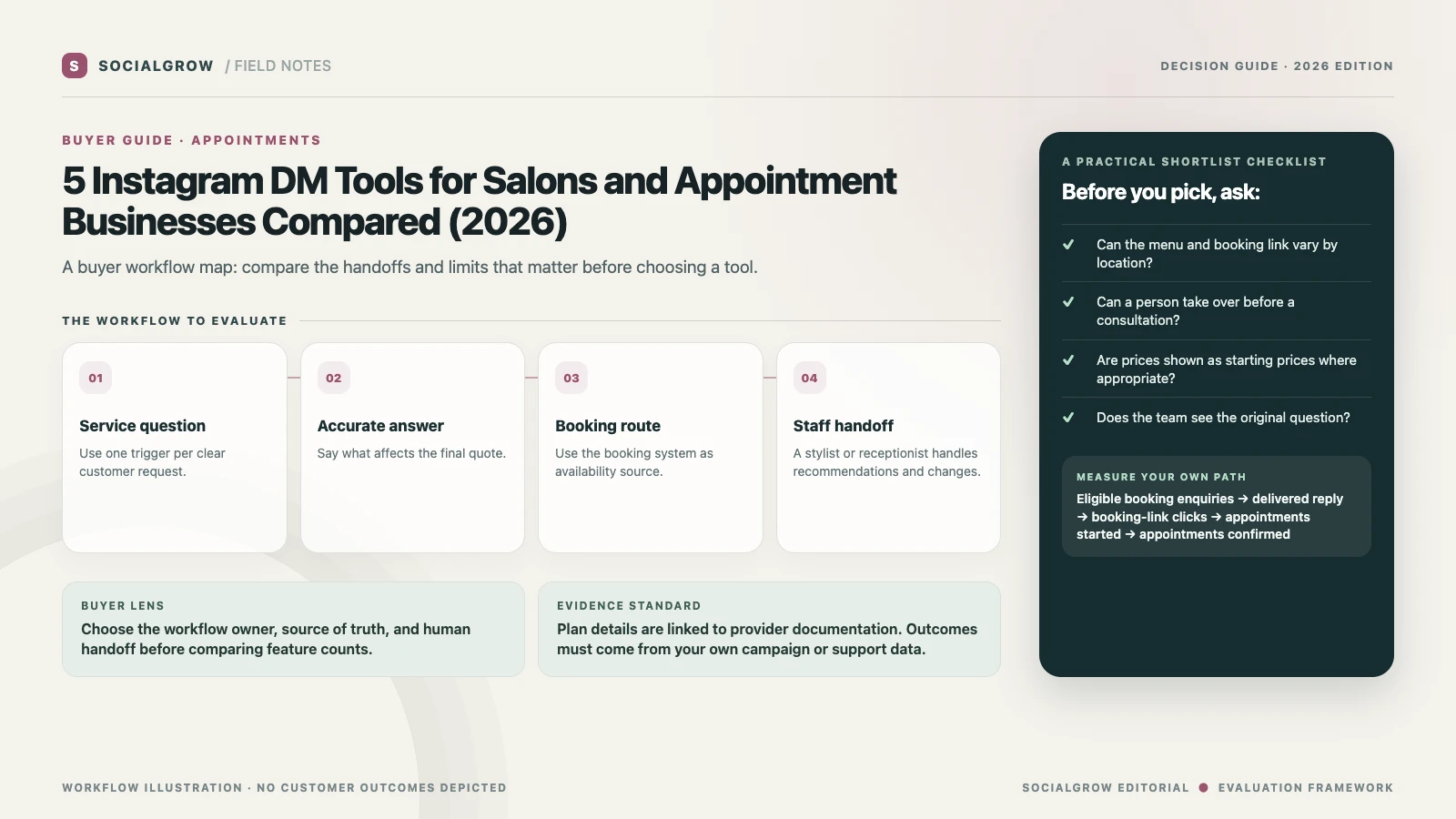
For a salon, an Instagram DM tool is useful when it shortens the path from “How much?” or “Can I book?” to the right service information and a real appointment slot. The comparison below focuses on message automation and handoff. It does not assume that any listed product owns your salon menu, stylist schedule, deposits, or cancellation policy.
The practical buying test is to choose one common enquiry and trace it all the way to the booking calendar. A tool that sends a generic booking link may be enough for one location. Multiple branches, service providers, consultation requirements, and variable pricing add requirements that need a live test.
5 best Instagram DM tools for salons, ranked
We rank tools for salon enquiries that need the current service menu, a relevant booking link, and a reliable handoff for questions about availability or service fit. Trigger coverage, contact context, multi-location needs, and plan limits drive the order. SocialGrow is our product.
| Ranked pick | Where it may fit | Verify before committing |
|---|---|---|
| #1 SocialGrow | Share the right service-menu or booking link from a post, then route color, extension, or appointment questions to the salon team. | Test location and stylist routing, keep prices current, and avoid confirming a time until the booking calendar does. Product overview · Pricing |
| #2 ManyChat | Build quick paths for service menus, new-client offers, and appointment enquiries across Instagram and other supported channels. | Confirm the booking step stays synchronized with the salon calendar and estimate contact overages across campaign peaks. Pricing |
| #3 CreatorFlow | Deliver an aftercare guide, new-client offer, or booking link from a salon post, with optional opt-in and click tracking. | Keep aftercare guidance approved by the salon and verify consent, export, and staff access for captured contacts. Pricing · trigger guide |
| #4 LinkDM | Send a direct service-menu, stylist portfolio, or booking-page link from eligible posts and Reels. | Check whether the trigger and usage cap fit the salon’s posting schedule, and route bespoke consultation requests to staff. Pricing |
| #5 Chatfuel | Continue an appointment enquiry on WhatsApp if that is the salon’s existing booking conversation channel. | Check whether the stylist, requested service, and location are clear after transfer; confirm the current flow and costs. Instagram workflow |
Budget for booking campaigns and staff access
Forecast by number of locations, staff accounts, and monthly service-menu or booking-link campaigns. Compare active contacts separately from monthly DM allowances; account count and staff access can matter more than a high message cap. Recheck the current ManyChat, CreatorFlow, and LinkDM plans.
Test the workflow before buying
Test the most common service question from a separate Instagram account. Check that the current menu and the correct branch’s booking page are sent, that real availability remains with the booking system, and that a stylist can take over questions about suitability or a custom quote.
Build a booking flow that does not overpromise
- Choose one repeat question. Start with hours, location, service menu, or the booking link. Avoid one broad auto-reply that tries to answer every service question.
- Keep the answer current. Use the current menu and a clear “from” price when the final price depends on hair length, treatment, stylist, or consultation. Do not hard-code availability that changes during the day.
- Send the person to the booking system. The scheduler should own open appointment times, deposits, and confirmations. If the calendar cannot receive the Instagram source, use a tagged landing page or a staff note to preserve attribution.
- Escalate the questions that need judgment. Color correction, allergies, treatment suitability, complaints, late changes, and unusual accessibility needs belong with a person.
Compare by salon setup
- Independent stylist: prioritize an easy booking handoff and accurate service menu over a multi-step flow builder.
- One salon with a reception team: confirm shared visibility, assignment, and who receives a question that the automation cannot answer.
- Multiple locations: test whether the chosen location is captured before the booking link is sent. Confirm that a customer cannot accidentally book at the wrong branch.
Measure confirmed appointments
Record the number of eligible questions, replies delivered, booking-link clicks, booking sessions started, and appointments confirmed. Calculate booking-link click rate = unique booking clicks ÷ delivered replies and booking completion rate = confirmed appointments ÷ booking sessions started. Use the salon’s own analytics and calendar data; these formulas are not external benchmarks. Separate reschedules and cancellations from completed appointments.
Use the existing Instagram auto-reply guide for salons for message examples, then compare the Instagram auto-reply product workflow and SocialGrow pricing if simple Instagram automation is the gap. If the salon needs a scheduling integration, verify it directly with the booking provider before buying an automation tool.
Sources and ranking method: Vendor product, help, and pricing pages linked above were checked September 24, 2026. We rank by published fit for the workflow and criteria described above. SocialGrow is our product. The order covers service-menu and booking-link workflows, not appointment volume or booking lift.
Frequently asked questions
Can Instagram automation book salon appointments? +
A DM tool can send a booking link or collect a simple preference, but the connected calendar should confirm live availability, deposits, and the final appointment.
What should a salon auto-reply include? +
Answer the specific question, link to the current menu or booking page, and explain when a stylist needs to advise personally.
Which salon details should not be automated? +
Do not promise a result or decide treatment suitability from a template. Route consultations, corrections, complaints, and exceptions to staff.
Related Articles
Instagram Auto-Reply for Salons: Booking, Price, and FAQ Messages
Use these Instagram auto-reply templates for salons and beauty businesses to answer prices, bookings, availability, location, and common client questions.
automation5 Best Instagram DM Tools for Local Service Businesses (2026)
Ranked Instagram DM tools for local services, compared by quote requests, service-area checks, booking links, routing, and team follow-up.
automation4 Best Instagram AI Chatbots for Sales (2026), Ranked
Our ranked Instagram AI chatbot picks for sales and lead qualification, compared by channel support, knowledge, actions, handoff, and setup.
Ready to automate your Instagram engagement?
Turn every comment into a conversation with SocialGrow.
Start Free Trial7-day free trial · No credit card required