Can You Auto-Post Instagram Reels to TikTok? What TikTok Allows
Can a tool post every new Instagram Reel to TikTok automatically? What TikTok's rules for apps say, the options that work, and the fastest safe workflow.
No tool can fully auto-post your Instagram Reels to TikTok while following TikTok’s rules. TikTok requires the creator to review each post and choose who can watch it before an app sends it. What a good tool can do is get that review down to about a minute: no download, no watermark, caption filled in, and one button. Your YouTube Shorts, on the other hand, can be fully automatic.
Here’s what TikTok actually says, the options that work, and the fastest workflow we know.
What TikTok’s rules say
Any app that posts to TikTok for you uses TikTok’s Content Posting API, and every app that uses it must follow TikTok’s content sharing guidelines. Three lines matter here:
- Users “must have full awareness and control of what is being posted”.
- “API Clients must only start sending content materials to TikTok after the user has expressly consent to the upload.”
- Listed as not acceptable: “An app that copies arbitrary contents from other platforms to TikTok.”
That last one describes an Instagram-to-TikTok autoposter almost word for word. It’s why apps that post to TikTok through the official API show you a review screen and ask you to choose who can watch each time. TikTok checks for this when it approves an app, and it can take that approval away.
Your options, compared
| Option | How automatic | Watermark | Your effort per Reel |
|---|---|---|---|
| Download from Instagram, upload to TikTok | Not at all | Often, unless you use the original export | 3 to 5 minutes |
| Send to TikTok drafts | Partly. The video lands in your TikTok inbox | No, if the tool uses the API | Open TikTok, finish the post |
| Review-and-post tool (like SocialGrow) | One click per Reel | No | About a minute |
| ”Fully automatic” Instagram-to-TikTok | Fully | Depends on the tool | None, but see below |
Uploading by hand works, but saving a Reel from the Instagram app can add a watermark, and another app’s watermark makes the post look recycled. If you do it this way, upload the export from your editor, not a re-downloaded copy.
Sending to drafts is how some apps get close to automatic. The tool sends the video to your TikTok inbox, and you open the TikTok app to add the caption, set who can watch and post it. That’s still a review, just done in TikTok instead of the tool.
Review-and-post tools do everything except the review. This is the approach SocialGrow takes, covered below.
Tools advertised as fully automatic. Some tools advertise posting every new Reel to TikTok with no action from you. Before relying on one, ask how it handles TikTok’s review requirement. If it posts with no review through the official API, that conflicts with the guidelines above. If it uses another method, check what that method is and whether your account is at risk.
The fastest workflow that follows the rules
The aim is to make the review so quick it doesn’t feel like work. With SocialGrow it looks like this:
- Connect once. Link your Instagram professional account and your TikTok account. You never share a password.
- Post on Instagram as usual. The new Reel appears on SocialGrow’s Cross-posting page with a Post button.
- Review and post. Your Instagram caption is already filled in. Choose who can watch, press Post to TikTok, and it’s live within a minute or two.
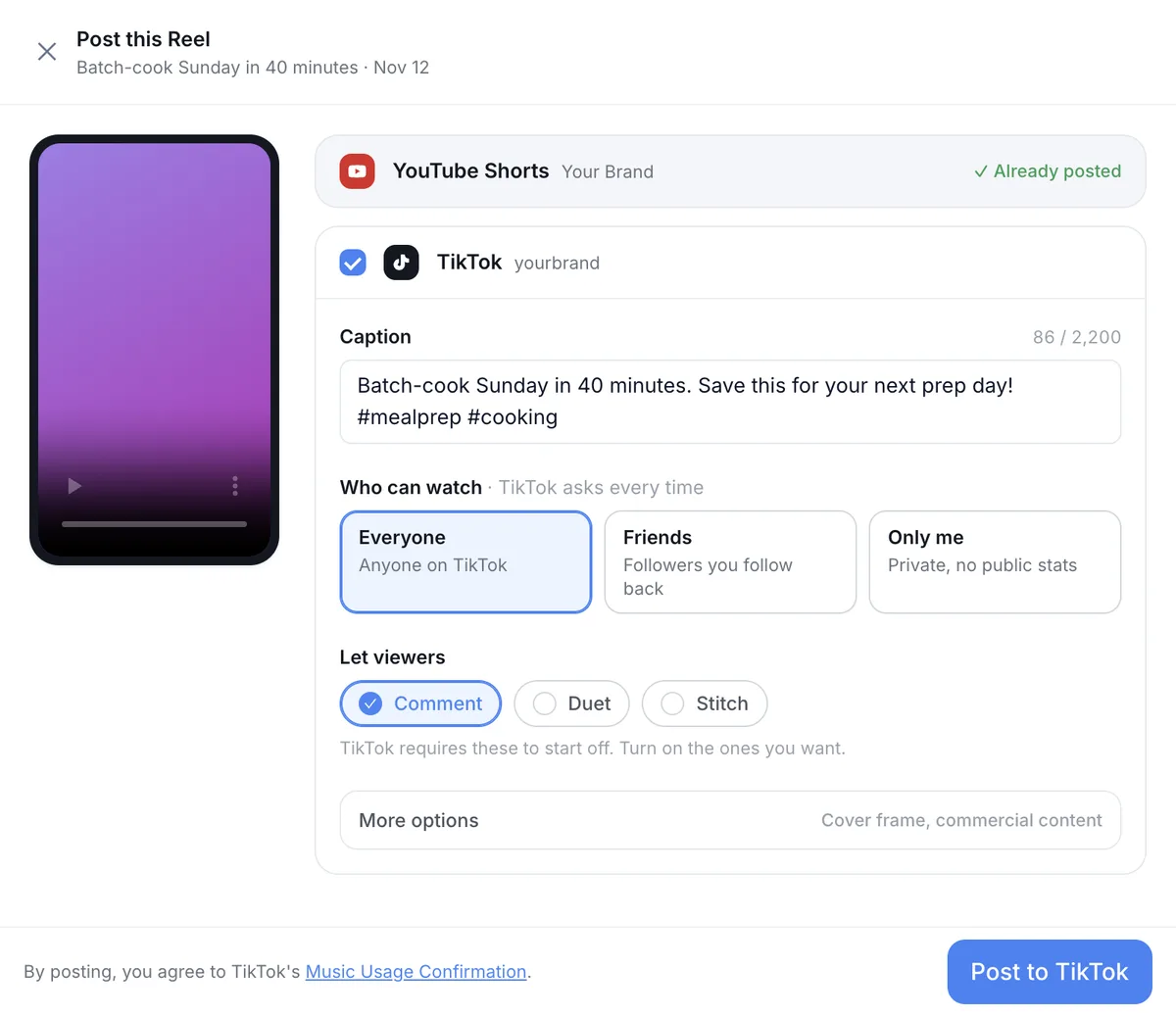
The video goes over as the original file Instagram stores, so there’s no watermark. If you also want the Reel on YouTube, leave YouTube ticked and the same button posts to both. Or set YouTube to Post automatically, so every new Reel becomes a Short on its own and only TikTok waits for your click.
For each option on the Post screen, see how to post Instagram Reels to TikTok.
Use the review to make the TikTok post better
The review step is also your chance to adapt the post, which usually helps it perform:
- Rewrite the first line of the caption. TikTok viewers decide fast. Lead with what they’ll get, not a long story.
- Swap Instagram-only calls to action. “Link in bio” or “comment GUIDE for the link” may not work the same way on TikTok.
- Check the music. A song from Instagram’s library may not be licensed for TikTok. Reels with original audio or a voiceover are safest, and some Reels with library music can’t be shared through the API at all.
- Pick who can watch. Posting to Everyone needs a public TikTok account. Use Only me first if you want to check how a video looks.
More on adapting the video in how to cross-post Instagram Reels to TikTok.
Bottom line
You can’t safely put TikTok on autopilot, and a tool that claims to is working around TikTok’s rules. Make the review fast instead: one screen, one click, no download. Put the automation where it’s allowed, on YouTube Shorts, so every Reel still ends up on all three platforms.
Try SocialGrow free for 7 days and post your next Reel to TikTok and YouTube Shorts in one go. See TikTok cross-posting or the all-in-one Reels to TikTok and Shorts workflow.
Frequently asked questions
Can I automatically post my Instagram Reels to TikTok? +
Not fully, if the tool uses TikTok's official API. TikTok's content sharing guidelines say creators must have full awareness and control of what is posted, and that an app may only send content after the creator expressly agrees to the upload. So each post needs a quick review. YouTube Shorts has no such rule and can be fully automatic.
Is there an Instagram setting that shares Reels to TikTok? +
No. Instagram can share Reels to Facebook, but it has no built-in option to post to TikTok. You either upload the video to TikTok yourself or use a cross-posting tool.
What is the fastest way to post Reels to TikTok? +
Use a tool that connects to both accounts through their official APIs, so it can send the original video file without a watermark. With SocialGrow you pick the Reel, choose who can watch, and press Post. It takes about a minute, and the same click can post the Reel to YouTube Shorts.
How many videos can I post to TikTok per day through apps? +
TikTok limits how many posts a creator can publish through apps in a day, and the limit is shared across every app connected to the account. TikTok's guidelines put it at around 15 posts per creator per day. Most creators never reach it.
Will my Reel have a watermark on TikTok? +
Only if you upload a video downloaded from the Instagram app. Tools that use Instagram's API get the original video file, which has no Instagram watermark.
Related Articles
ChatGPT and Claude for Instagram: 32 Prompts That Use Your Real Data
Use ChatGPT or Claude for Instagram captions, Reel hooks, replies and analytics. 32 copy-paste prompts, plus how to give the AI your real account data.
growthInstagram Content Ideas from Your Past Reels with Claude
Use Claude and SocialGrow to find Instagram content ideas from your past Reels. Compare saves, shares and follows, then draft a matching comment-to-DM offer.
growthHow to Get More Instagram Story Replies: 12 Tactics That Start DMs
Get more Instagram Story replies with reply prompts, keyword offers, reaction-friendly formats, and fast follow-up. 12 tactics that turn viewers into DMs.
Post your Reels to TikTok in two clicks
SocialGrow sends the original video with no watermark, fills in your caption, and can post the same Reel to YouTube Shorts automatically.
Start posting Reels to TikTok