Post every Reel to YouTube Shorts and TikTok too
You post on Instagram like always. SocialGrow puts the same video on YouTube Shorts automatically and on TikTok in one click.
- No downloading or re-uploading
- Original file, so no Instagram watermark
- Works for your older Reels too
7-day free trial · No credit card · Then $14.99/month

How do I post one video to Reels, Shorts and TikTok at the same time?
Post it on Instagram as a Reel, then let a cross-posting tool send it to the other two. With SocialGrow you connect Instagram, YouTube and TikTok once and choose Post automatically for YouTube. Every new Reel then becomes a YouTube Short on its own, with an AI-written title. For TikTok, the Reel waits with a Post button, because TikTok requires you to review each post; choose who can watch and press Post. The original video file is used, so there's no Instagram watermark. It costs $14.99/month with a 7-day free trial.
Watch the whole setup in 3 minutes
A real walkthrough of the YouTube side: connecting accounts, choosing automatic or manual posting, skip rules, older Reels and AI titles. TikTok uses the same screen, with a Post button on each Reel.
Set it up once, then post like you always do
Connect three accounts
Instagram, YouTube and TikTok, each with its own official sign-in. About five minutes, once.
Choose Post automatically for YouTube
From now on every new Reel becomes a Short on its own, with a title written for you.
Press Post for TikTok
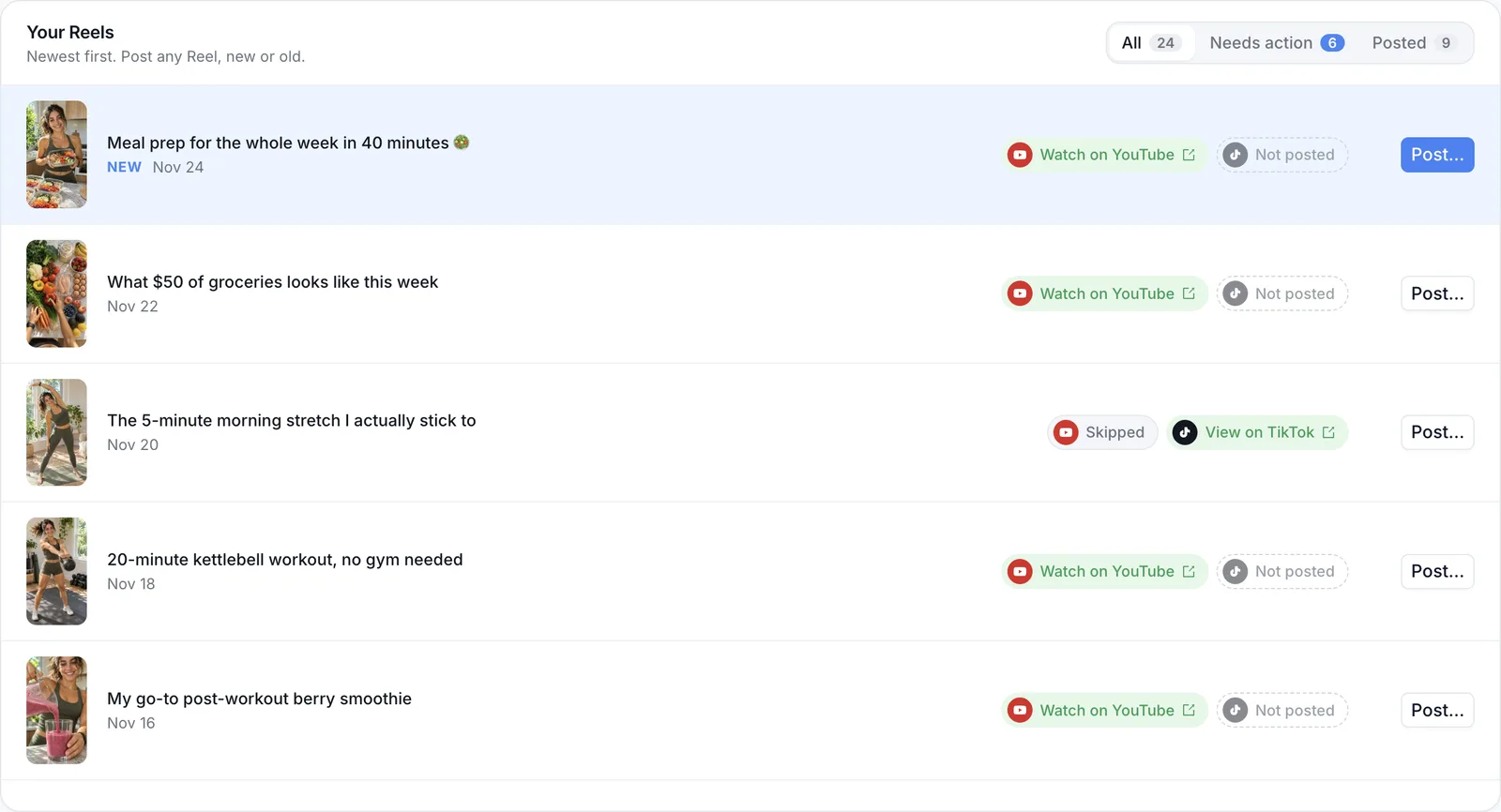
New Reels wait in your list. Choose who can watch and press Post. That is the only step you repeat.
What happens on each platform
The same video, set up the way each platform expects.
YouTube Shorts
- How it gets posted
- Automatically, or press Post
- Title and caption
- AI-written title (up to 100 characters), caption as the description
- Who can see it
- Public, Unlisted or Private, set once for automatic posts
- Video length
- Up to 3 minutes
- Older Reels
- Any Reel, one at a time
TikTok
- How it gets posted
- Press Post (TikTok asks you to review each one)
- Title and caption
- Your Instagram caption, ready to edit (up to 2,200 characters)
- Who can see it
- Chosen on every post, from the options your account allows
- Video length
- Depends on your account; checked before posting
- Older Reels
- Any Reel, one at a time
Want to check a Reel before it goes anywhere? Choose I'll post myself for YouTube too. Then Post a Reel opens one screen with a YouTube section and a TikTok section, and one button posts to both.
Three ways to get one video on all three
Which one fits depends on where you finish your videos.
Upload to each app yourself
Export once, then upload to Instagram, YouTube and TikTok one by one. Free, but it takes 10 to 15 minutes per video, and re-downloaded Reels can carry a watermark.
Use a multi-network scheduler
Tools like Buffer, Later or OneUp take one upload and schedule it to each network. Good when videos are finished days ahead, but you upload everything to the scheduler instead of posting in the Instagram app.
Post on Instagram, cross-post the rest
Keep posting Reels from Instagram. SocialGrow picks each one up, puts it on YouTube Shorts automatically and on TikTok with one click. You never upload the same video twice.
Price check: SocialGrow is $14.99/month with both platforms and Instagram comment-to-DM included. Repurpose.io starts at $35/month and OneUp at $25/month, and both cover more networks. See SocialGrow vs Repurpose.io and SocialGrow vs OneUp.
Frequently asked questions
How do I post one video to Instagram Reels, YouTube Shorts and TikTok?
Post it as a Reel on Instagram, then let a cross-posting tool send it to the other two. With SocialGrow, connect Instagram, YouTube and TikTok once. Every new Reel goes to YouTube Shorts automatically, and appears with a Post button for TikTok, where you choose who can watch and press Post. One button can also send any Reel to both at once.
Can I post to YouTube Shorts and TikTok automatically?
YouTube Shorts, yes. TikTok, not fully: TikTok requires the creator to review each post and choose who can watch before an app sends it. SocialGrow keeps the TikTok step to about a minute per Reel.
Will there be an Instagram watermark on TikTok or YouTube?
No. SocialGrow sends the original video file Instagram provides through its official API, not a download from the app, so no Instagram watermark is added on either platform.
Do I need a different caption on each platform?
It helps. SocialGrow writes a YouTube title from your caption with AI, uses the caption as the YouTube description, and fills in the Instagram caption for TikTok so you can edit the first line before posting.
Can I post my older Reels to TikTok and YouTube?
Yes. Every Reel on your Instagram account is listed, old or new. Press Post on any of them to send it to YouTube, TikTok or both. Older Reels go one at a time.
How long can the video be?
Instagram Reels and YouTube Shorts both allow up to three minutes. The TikTok limit depends on your account, and SocialGrow checks it before you post.
Is a scheduler like Buffer or Later better for this?
A scheduler suits you if you finish videos on a computer and plan posts days ahead, because you upload once to the scheduler and pick each platform. If you post Reels from the Instagram app first, a cross-posting tool like SocialGrow is simpler, because it picks the Reel up from Instagram and you never upload it twice.
How much does it cost?
SocialGrow costs $14.99/month, with YouTube Shorts and TikTok cross-posting and Instagram comment-to-DM automation in one plan. Repurpose.io starts at $35/month and OneUp at $25/month. SocialGrow has a 7-day free trial with no credit card.
Is it safe to use SocialGrow, or will Instagram flag my account?
SocialGrow connects through Meta authorization and uses official Instagram APIs. It does not ask for your Instagram password or scrape your account. No provider can guarantee that an account will never be restricted: use supported triggers, send relevant replies to people who interacted, and follow Meta's current messaging rules and limits. You can disconnect the app at any time.
One Reel. Three platforms.
Connect your accounts in five minutes and your next Reel is everywhere.
7-day free trial · No credit card · Then $14.99/month
Related guides
Reels to TikTok
TikTok posting in detail, compared with Repurpose.io and OneUp
Reels to YouTube Shorts
Fully automatic Shorts with AI-written titles
Can you auto-post Reels to TikTok?
What TikTok's rules for apps allow
Set up TikTok posting
Step by step, with every option explained
Set up YouTube posting
Pick a channel and turn on automatic posting
Watermarks, copyright and reach
What changes when a Reel goes to another platform