SocialGrow Help Center
How to post Instagram Reels to TikTok
Connect TikTok, pick a Reel, choose who can watch, and post it. No download and no watermark. Post the same Reel to YouTube Shorts in one click.
SocialGrow posts your Instagram Reels to TikTok for you. You don’t download anything and there’s no Instagram watermark, because SocialGrow sends the original video file. TikTok asks you to review every post, so each Reel takes one click on Post. The same screen can post it to YouTube Shorts too.
New to SocialGrow? Start a free trial and open Cross-posting. TikTok posting is included in every plan, with a 7-day trial and no card needed.
Before you start
- Connect the Instagram account your Reels are on. If you haven’t yet, follow the Instagram connection guide.
- Have your TikTok login ready.
- If you want everyone to see your posts, your TikTok account must be public. Private accounts can still post for followers, friends, or only you.
Step 1: Connect TikTok
- Open Accounts in SocialGrow.
- In the TikTok section, choose Connect TikTok.
- Sign in to TikTok and allow SocialGrow to post for you. You never share your password with SocialGrow.
You’ll come back to SocialGrow with your TikTok account listed. To add a second TikTok account later, choose Add account in the same section.
Step 2: Pick a Reel
Open Cross-posting. Every Reel from your Instagram account is listed, newest first, with a TikTok status next to each one.
- To post a Reel from the list, choose Post… on its row.
- Or choose Post a Reel at the top of the page and pick one from the grid.
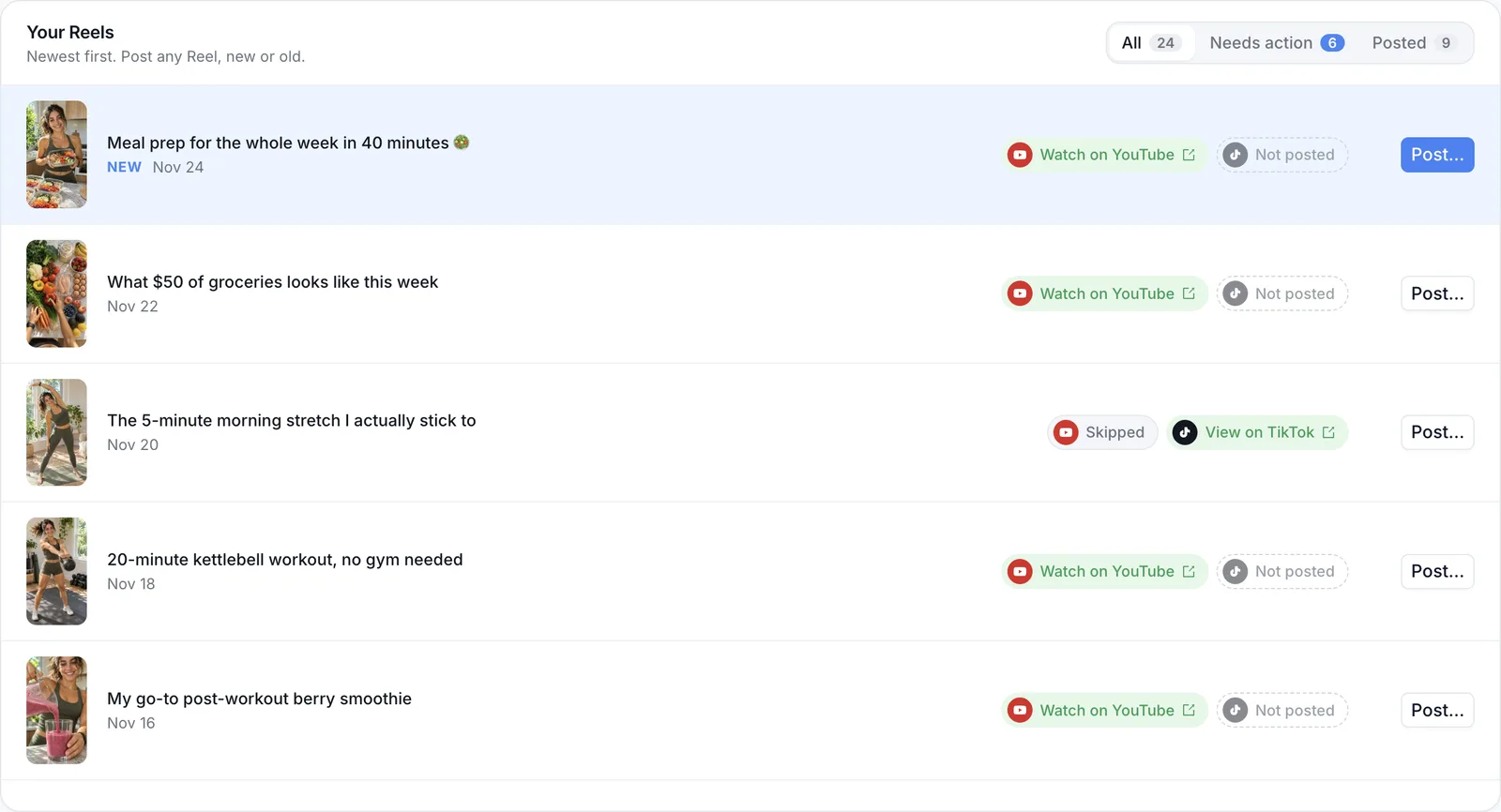
Old Reels work the same way as new ones. The Needs action filter shows Reels from the last 7 days that aren’t on TikTok yet, plus any post that didn’t go through.
Step 3: Choose the TikTok settings
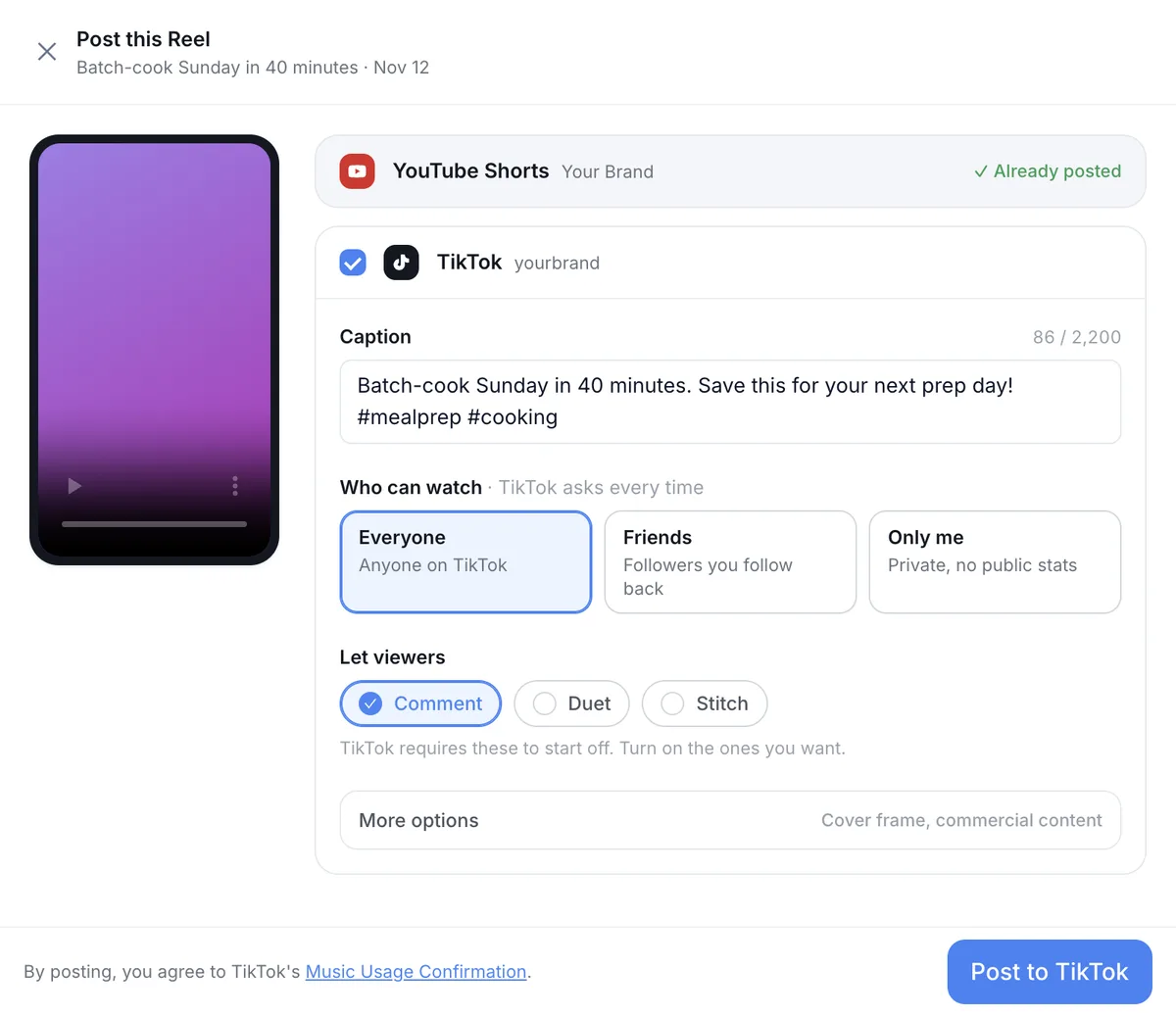
The Post this Reel screen shows a preview of the video and a TikTok section. Fill in:
| Setting | What it means |
|---|---|
| Caption | Filled in from your Instagram caption. Edit it if you want a different first line or hashtags for TikTok. |
| Who can watch | The options your TikTok account allows, such as Everyone, Followers, Friends (followers you follow back) or Only me. TikTok makes you pick one every time; nothing is preselected. |
| Let viewers | Comment, Duet and Stitch start off, because TikTok requires it. Turn on the ones you want. |
| More options | Cover frame picks which second of the video becomes the thumbnail. Turn on Commercial content only if the video promotes a brand, product or service. |
If the video promotes your own business, tick Your brand and TikTok labels it “Promotional content”. If someone paid you or gave you something for it, tick Branded content and TikTok labels it “Paid partnership”. Branded content can’t be set to Only me.
Step 4: Post
Press Post to TikTok. Pressing it means you agree to TikTok’s Music Usage Confirmation, which is linked just above the button.
The row shows Posting… and usually turns into View on TikTok in under a minute. Choose it to open the video. Views appear in SocialGrow a few hours later.
Post to TikTok and YouTube Shorts at once
If YouTube is connected, the Post this Reel screen has a YouTube section too. Leave both ticked and the button reads Post to YouTube and TikTok. Untick a platform to skip it for this Reel.
YouTube can also post new Reels automatically while TikTok waits for your click. See how to cross-post Reels to YouTube Shorts.
Why doesn’t TikTok post automatically?
TikTok’s rules for apps say the creator must review each post and choose who can watch before it’s sent. No tool that uses TikTok’s official API can skip that step. More in can you auto-post Instagram Reels to TikTok? When a new Reel goes live on Instagram, it appears in your Cross-posting list with a Post… button, ready for you.
Something went wrong
The Reel can’t be posted. Reels that use a song from Instagram’s music library sometimes don’t come with a downloadable video file, so they can’t be sent to TikTok or YouTube. Reels with your own voice, original audio, or music you licensed work best.
“This video is … seconds.” Each TikTok account has a maximum video length. If the Reel is longer, it can’t be posted to that account.
“You’ve reached today’s limit of TikTok posts.” TikTok limits how many videos an account can post through apps each day. Wait until your oldest post from today is 24 hours old, then try again.
Everyone isn’t an option. Your TikTok account is private. Make it public in the TikTok app, or choose Followers or Friends.
The post failed. The row shows the reason. Nothing is posted to TikTok when a post fails, so it’s safe to try again from Post…. If the error mentions your connection, reconnect TikTok from Accounts.
What does it cost?
TikTok posting is part of the SocialGrow plan, together with automatic YouTube Shorts posting and Instagram comment-to-DM automation. See pricing for the current price and the free trial.
Start posting Reels to TikTok with SocialGrow, then connect TikTok from Accounts.
For more on what to change between Instagram and TikTok, read how to cross-post Instagram Reels to TikTok or see the TikTok cross-posting overview.